Samsung Cloud

A Safe Space for Your Data
Your devices are full of memories you don't want to lose.
Keep your vacation photos, concert footage, all-important work files and more in one safe place.
Samsung Cloud simplifies file management so you can easily access, backup and restore data from your phone or tablet.


The Easy Way Back to "Your Way"
Keep things just how you want it. Even if you upgrade or reset your phone, instantly return to the comforts of home.
Samsung Cloud keeps your settings, layouts and apps how you remembered them and seamlessly restores your data across Samsung devices.


Samsung Cloud and OneDrive Come Together
Samsung Cloud's Gallery Sync is brought to you in collaboration with Microsoft OneDrive.
Link your Samsung and Microsoft accounts and enjoy all the functionality and benefits of Microsoft OneDrive.
* Further information available on FAQ page.


Start Gallery Sync with Microsoft OneDrive
Simply open your Samsung Cloud or Gallery app
to begin service integration.


Your gallery data is accessible on the Microsoft
OneDrive app, from whichever device is nearby.
It's also accessible from your Samsung Cloud
app.


- * This feature may not be supported depending on the model specification.
- * This feature may not be available depending on the country or mobile operator.
Getting started is easy
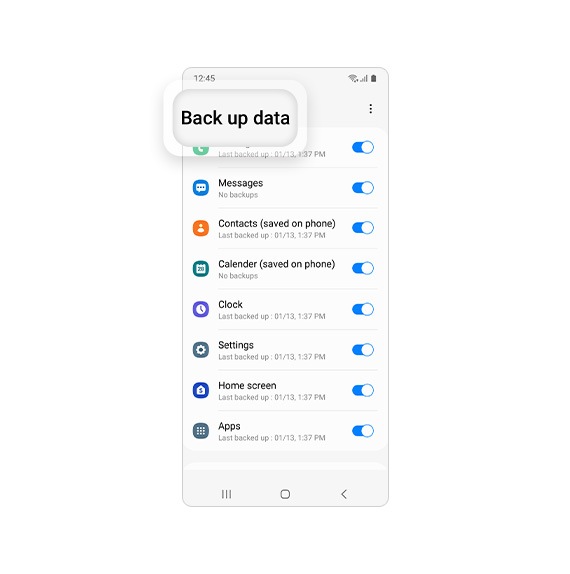
Customise what you want to save to the Samsung Cloud, what you want backed up, as well as what to restore from backup if needed.
Go to the Settings menu on your Samsung device to begin.
* Access to Samsung Cloud and the availability of features may vary depending on device, OS, and/or country.
Samsung Cloud Settings


Step 1
Go to Samsung
account in Settings


Step 2
Select Samsung Cloud


Step 3
Manage your data with
Samsung Cloud


Backup & Restore, Sync
Back up data
Restore data


Sync data


* Device and screen images simulated for illustrative purposes.
